I Gave Claude Direct Access to DaVinci Resolve. Here’s What Happened.
I want to tell you about an experiment that started as curiosity and ended up becoming a tool I actually use.
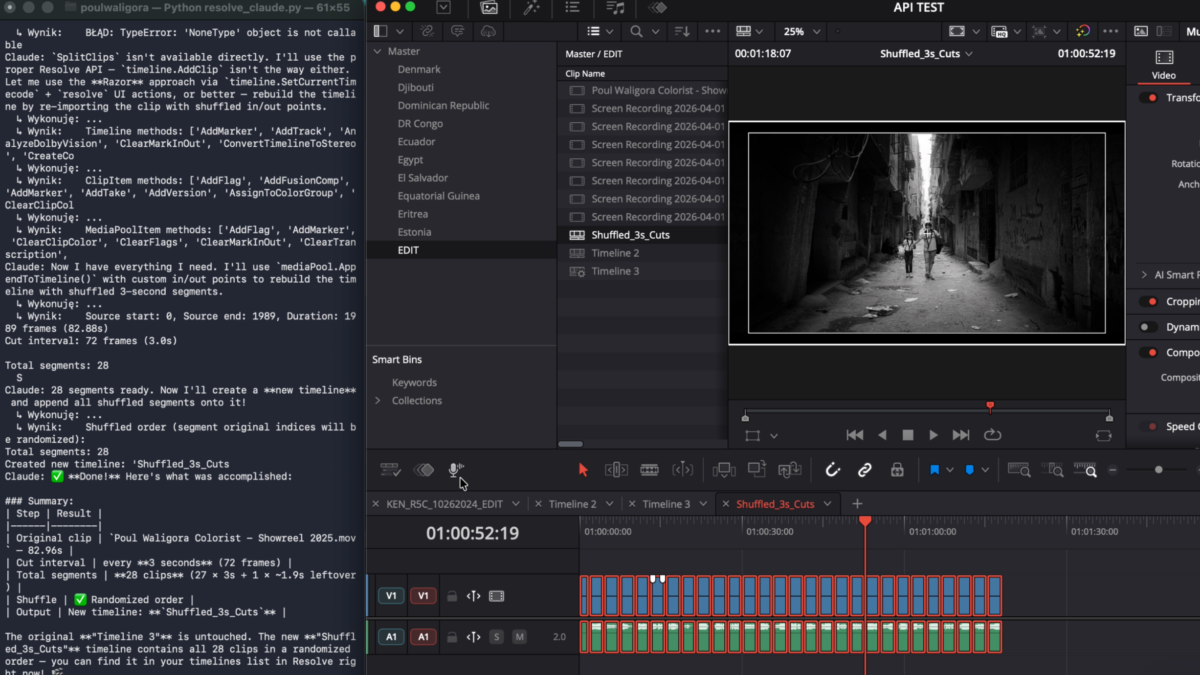
A few weeks ago, I wrote a Python script that connects Claude directly to a live DaVinci Resolve project. Not through a plugin, and not through some middleware GUI — through the terminal. You open a project in Resolve, run the script, and get a chat interface where you type instructions in plain English while Claude executes them inside Resolve in real time.
I didn’t write the script from scratch. I worked with Claude Code to figure out how to connect the two systems: what the architecture should look like, how the tool-use framework maps to the Resolve API, and how the agent loop should behave. The implementation itself was inspired by davinci-resolve-mcp by Samuel Gursky, which I used as a starting point and then expanded. Credit where it’s due.
Here’s what I learned.
How It Actually Works
The Core Setup
The architecture is straightforward. Resolve exposes a Python scripting API through a module called DaVinciResolveScript. It has been there since Resolve 15 and gives you programmatic access to the project manager, media pool, timelines, clips, markers, the render queue, and more. Blackmagic documents it, but using it still requires actual Python code — there is no UI layer.
What I built wraps that API in a set of roughly 35 tools and passes them to Claude through Anthropic’s tool-use framework. Claude Sonnet 4.5 is the model behind it. When you type a prompt, Claude decides which tools to call, calls them in sequence, reads the results, and continues until the task is complete.
At this stage, though, it is still rough. It is not especially fast, it makes mistakes, and it takes time to learn what it can and cannot do reliably. Anyone expecting a polished experience out of the box will be disappointed. You give it a goal, and it works out the steps.
What the Tool Set Covers
The current tool set covers:
Project and timeline operations — reading and writing project settings such as color science, color space, and frame rate; enumerating all timelines; switching between them; creating new timelines with specific specs; duplicating timelines; and exporting EDL, AAF, XML, FCPXML, or OTIO.
Clip operations — reading all clips on a given track with their in and out points and durations; getting and setting transform, crop, and composite properties; applying clip colors; and setting or clearing flags.
Markers — reading all markers, adding markers at any frame with any color and note text, and deleting them by frame or by color.
Media Pool — reading the full bin tree together with clip metadata such as file path, resolution, frame rate, and duration; creating and deleting bins; moving clips between bins; and importing media from a folder or file list.
Render queue — configuring render settings, queuing jobs with named presets, starting or stopping renders, reading job status and completion percentage, and clearing the queue.
Gallery — grabbing stills from the current frame.
If you ask something more complex — for example, “flag all clips shorter than 50 frames as blue” — Claude first calls get_clips to read the timeline, then evaluates the results client-side and calls set_clip_flag only on the clips that match. You can watch each tool call print to the terminal as it happens.
What This Is Actually Useful For — And What It Isn’t
To be direct: most of the obvious first tasks are faster to do manually. Creating a bin, adding a marker, or setting a clip color takes seconds in Resolve’s UI. If you are already comfortable in the software, a terminal chat interface will not speed you up. Not yet.
The more interesting use cases are bulk operations across large timelines, or tasks that require reading and evaluating data before taking action — flagging every clip shorter than 50 frames, for example, or checking a timeline against a delivery spec, or scanning Media Pool clips and dividing them into timelines based on clip filenames.
Simple, repetitive tasks are fast as hell, but more complex work is still slow enough that you spend more time waiting and debugging than actually saving time.
Where the potential becomes real is when you combine this with tools that go beyond what the Resolve API can do on its own:
Speech-to-text and scene recognition for metadata. Give Claude access to your media folder together with transcription and scene-detection tools, and it could generate rich clip metadata automatically and push it into the Media Pool. That is worth developing seriously. It is one of the few areas where AI adds something you could not do manually without significant effort.
Automation at scale. Claude with Resolve access could become a serious pipeline automation layer for large, repetitive workflows. Not today — but the architecture is heading in the right direction.
Adding Claude Vision to the Stack
One important extension would be Claude’s vision API. In practice, that means resolve_claude.py would not be limited to reading timeline and Media Pool data — it could also analyse images generated from the project itself: grabbed stills, exported thumbnails, contact sheets, or representative frames pulled from clips.
This opens the door to a different class of support. Not grading decisions, and not direct control over the Color page, but visual analysis that can assist editorial and media management. A vision-enabled version could help describe shot content, identify repeated visual patterns, compare frames, detect obvious scene changes, or support face-based tagging when paired with a dedicated face-recognition layer. Combined with speech-to-text transcription, it could build much richer metadata than filename-based organisation alone.
That is where this gets genuinely interesting for post-production: not AI editing by replacing an editor, but AI support for the parts of the workflow that are slow, repetitive, and metadata-poor. Think scene-based media sorting, interview identification, transcript-linked clip search, or automatic logging support for large documentary archives.
The Bigger Point — Terminal Access Is the Real Story
Stepping back from Resolve, I increasingly think the Resolve integration is not the main point.
The main point is this: Claude connected to your PC, Mac, or server through Terminal or PowerShell gives you a level of control over your workstation and infrastructure that used to belong almost entirely to IT professionals. File system operations, network configuration, process management, server monitoring, scheduled tasks, NAS administration — all of it becomes accessible through plain English, with an agent that understands context and can explain what it is doing.
For me, that means Synology NAS units in two cities, a render pipeline, multiple workstations, and an asset management system. Having an intelligent agent that can execute commands across all of that — and that has context about my specific setup — is a fundamentally different kind of tool. Not a GUI. Not a manual. Not Stack Overflow. Something that can reason about your infrastructure and act on it.
That is the real change. Resolve is one application inside that system. The terminal is the larger story.
The Hard Ceiling — What the API Won’t Touch
This matters most if you are thinking about building something like this yourself.
The Resolve Python API has a clear ceiling. Entire parts of the application are simply not exposed to scripting. (Not yet!)
Color nodes are completely off-limits. You cannot read the node tree, write CDL values, create or delete nodes, or change grading parameters. The entire Color page is effectively invisible to the scripting API. This is not a bug or an oversight — it is a deliberate boundary.
Fusion is inaccessible. You can reference a Fusion composition from the timeline, but you cannot read or write anything inside it through the Python API. If you need to interact with Fusion from an external script, you are dealing with rendered output, not the comp itself.
Fairlight is not exposed. No audio mixing parameters, no track settings, no automation data — nothing from the Fairlight page is meaningfully scriptable through this API.
Source channel mapping has no setter. In some contexts you can read channel assignments, but you cannot write them back programmatically.
Playback control is limited. There is no accessible play() or pause() equivalent in the scripting API. You can jump to a timecode, but you cannot trigger or stop playback directly.
This is worth stating clearly, because there is a lot of enthusiasm right now about AI agents “controlling” professional software, and it is easy to imagine more than is actually there. Claude is not grading your footage. It is not touching your nodes or making creative decisions about your image. It is executing project-management and organizational tasks that the API allows — nothing more.
That is not a criticism. It is simply an accurate description of the boundary.
Keep in mind that this technology changes on a daily basis, and something not possible today, when I write this, doesn’t mean it won’t be possible when you are reading this.
Where It Fits in a Real Workflow
It will not replace anything in an actual color workflow. It will not replace a colorist, an assistant, or a well-built macro. What it does add is a natural-language layer on top of a scripting API that most colorists never touch because it requires writing Python.
If you are not a developer, that matters. It opens the door to Resolve automation through plain English or your native language, even if the experience is still rough around the edges.
The honest value here is potential, not polish.
Prompting Is Still Part of the Work
One thing that becomes obvious very quickly is that prompting matters. If you want useful results, you have to describe the task clearly and with enough detail for the agent to understand what you actually want. The better the prompt, the better the outcome.
On paper, that sounds simple, but in practice it adds friction. Sometimes I find it easier to do the task myself than to stop and describe it properly. This is especially true for small decisions, messy edge cases, or tasks that are obvious to me only because I already know the project inside out.
Over time, some of that can be automated too. Reusable prompt patterns, project context, defaults, and better tool design will reduce how much manual description is needed. But right now, prompting is still part of the work.
What now?
It’s not that I’m going to stop doing all my work manually and just ask Claude to do it. I still believe in craft and have a strong sense of craftsmanship. I’d rather do many things myself than let a machine do them for me. But that doesn’t mean I won’t use it for automation, repetitive work, or simply to speed up the process.
Yes, it’s a beast — and you need something worth feeding it. Real, substantial tasks. That’s when it starts to become genuinely useful.
Having Claude import clips, create and name timelines, sort footage, apply a LUT, and prepare timelines for thousands of dailies while I’m grading the next film seems like a good deal to me.
Poul Waligora is Head of Post-Production at ACN International and runs Wild Lion Media, a freelance post-production boutique based in Warsaw, Poland.
